A master resume that fills itself in from your résumés
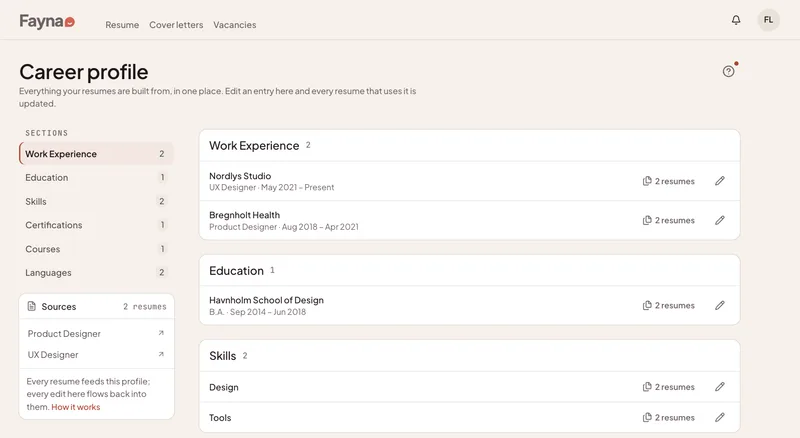
Fayna's career profile keeps the entries of every résumé you upload or write, once. Edit a job, a degree or a skill there, and the résumés in the same language that share it follow.
Your master resume, kept for you
A master resume is one place that holds everything you have done, so each résumé you send can draw from it. In Fayna, that place is your career profile. It sits behind all your résumés and keeps the entries from every résumé you upload or write, once.
You do not build it by hand. It fills itself in as you add résumés.
The career profile holds the entry sections of your résumés:
- work experience
- education
- skills
- languages
- projects
- certifications
- and the other entry sections
Your summary and career objective are not shared. Each résumé keeps its own, so you can write them for the role in front of you.
One entry, even across languages
The same job found in two résumés is kept as one entry. This also holds when the résumés are in different languages: the entry then shows its language variants.
When two entries look alike, Fayna asks whether they are the same one and waits for your answer. Nothing merges until you say so.
Editing once, and choosing where it applies
In the career profile
You can edit an entry in the career profile, and every résumé in the same language that shares it follows. A résumé in another language, or one changed on purpose, is told about the change and keeps its text until you apply it.
Inside a résumé
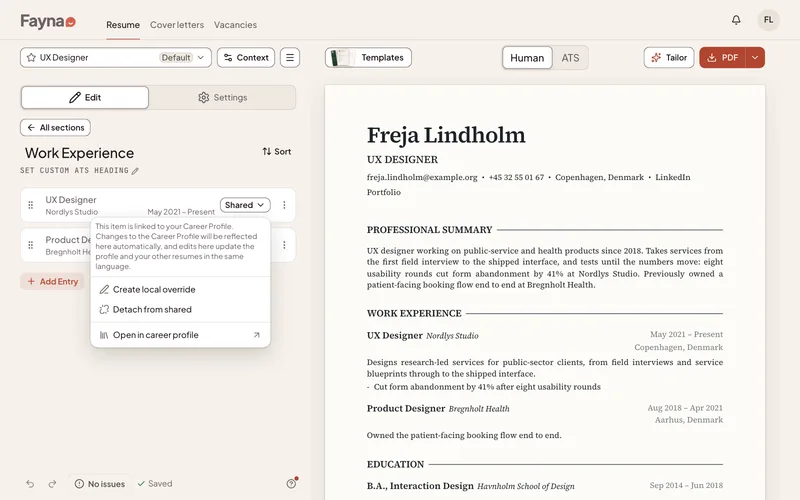
Editing a shared entry inside a résumé updates the career profile and your other résumés in the same language. To change it for that résumé only, choose “Create local override”. The career profile and your other résumés then stay as they are.
Adding entries and starting new résumés
- An entry you add to one résumé can be shared to the career profile.
- The editor has a panel, “From your career profile”, to add an entry the résumé does not have yet.
- You can create a new résumé straight from your career profile. All its entries are then shared.
Unlinking and deleting
You can unlink a résumé, or one entry, from the career profile. The text stays in the résumé and stops following the career profile.
Deleting an entry from the career profile does not delete it from résumés that hold a copy. The copy stays and stops receiving updates.
What the free plan includes
The career profile is included in the free plan, which is limited to one résumé. The sharing between résumés starts to matter once you have more than one of your own.
A paid plan adds more résumés of your own, and they all share the same career profile.
Related
Questions about the career profile
No. Fayna's career profile fills itself in as you add résumés. It keeps the entries from every résumé you upload or write, once.
No. Your summary and career objective are not shared. Each résumé keeps its own, while the entry sections such as work experience, education and skills are kept in the career profile.
No. When two entries look alike, Fayna asks whether they are the same one and waits for your answer. Nothing merges until you say so.
It is told about the change and keeps its text until you apply it. Résumés in the same language that share the entry follow the edit.
Inside that résumé, choose “Create local override”. The career profile and your other résumés then stay as they are.
Yes. You can unlink a résumé, or one entry. The text stays in the résumé and stops following the career profile.
No. Résumés that hold a copy keep it. The copy stays and stops receiving updates.
The career profile is included in the free plan, which is limited to one résumé. Sharing between résumés starts to matter once you have more than one, and a paid plan adds more résumés that all share the same career profile.
Let your résumés fill in your career profile
Upload a résumé you already have, or write a new one. Its entries become your career profile.