A CV for Europe: how Fayna sets it up
There is no single CV rule for the whole of Europe. When you choose EU General as the target market, Fayna applies the defaults below: which personal details stay off the page, how much of your address to show, and how references are handled.
Personal details: what Fayna leaves to you, and what it removes
A CV for Europe usually keeps the focus on your work, your education and your skills rather than on personal details. Under EU General, Fayna treats four personal details like this:
- Photo: better left out. Fayna neither adds nor removes one.
- Date of birth: better left out. The decision stays with you.
- Nationality: better left out. The decision stays with you.
- Marital status: removed. Fayna leaves this field out of the résumé preview, the PDF export and AI tailoring.
These are Fayna’s defaults for a CV sent across Europe, not an EU rule. A country page, such as the one for Germany, shows where a single country differs.
The rules Fayna applies under EU General
- Better left out
- Better left out
- Better left out
- Do not include
Fayna removes it from the exported CV
- City only
Fayna warns you in the editor
- Month optional
- On request
Fayna applies this by default
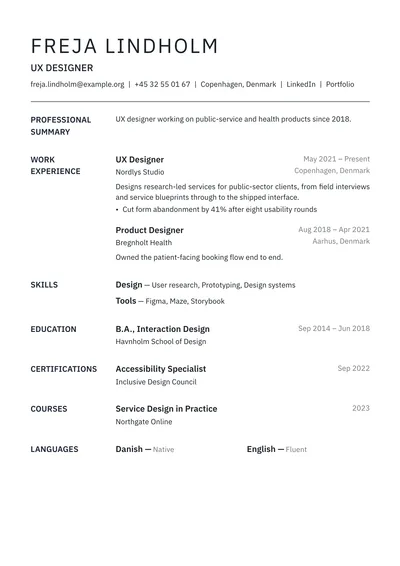
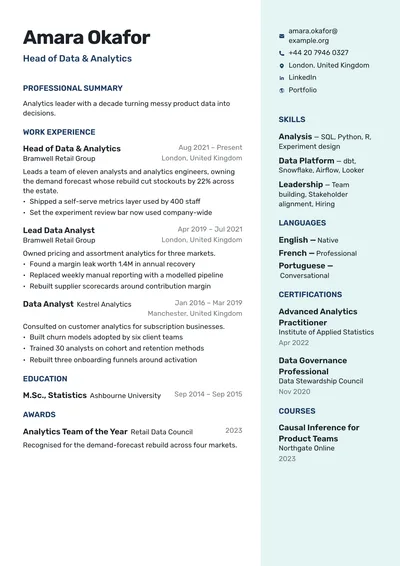
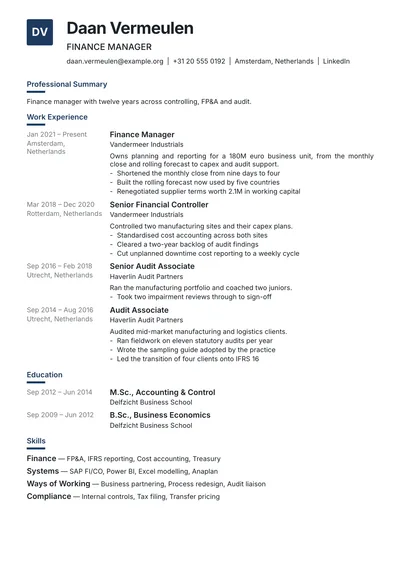
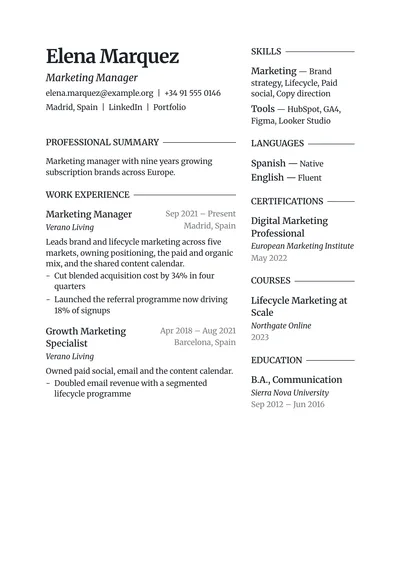
CV designs for Europe without a photo
Four clean, neutral designs with clear section labels. The sample content shows the design only; open any design to see it in full.
Clean, neutral designs with clear section labels and no photo.
Your address and your dates
Address: city only
Fayna’s default for Europe is your city, not a full street address. The editor warns when the location holds a full street address, so you can shorten it to the city.
Dates: the month is optional
For the dates of your jobs and studies, the month is optional. You can write only the year, or the month and year if you want to be more precise.
References: available on request
Under EU General, Fayna treats references as available on request rather than listed in full on the CV.
The ATS version of your CV leaves the References section out by default. If you want it there, you can show it.
Europass, the European Union’s own CV service
The European Commission runs Europass, a service with its own CV editor and format (Europass, create your CV). Its advice differs from Fayna’s defaults in one place: it invites you to add a professional photograph.
Fayna’s CV for Europe is not a Europass CV, and Fayna is not part of Europass. The defaults on this page are Fayna’s own; where an employer or a country asks for something else, follow them.
Choosing EU General for your CV
In the editor, a résumé's context settings list the target market first, above the content language and the format preset. That is where EU General is chosen.
If you are still picking a European CV template, browse the CV templates. If you are unsure whether you need a CV or a résumé, see résumé vs CV.
The matching cover letter
Start a CV for Europe
Choose EU General as the target market in your résumé’s Context settings, and the editor applies the rules above.
Questions about writing a CV for Europe
Under EU General, Fayna treats a photo as better left out and neither adds nor removes one. Europass, the EU’s own CV service, invites you to add a professional photograph. Whether you add one is your decision.
Under EU General, Fayna treats both as better left out and leaves the decision to you. Your CV can focus on your experience, education and skills instead.
Marital status is left out. Fayna leaves this field out of the résumé preview, the PDF export and AI tailoring.
Only your city. The editor warns when the location holds a full street address, so you can shorten it.
No. Under EU General the month is optional: you can give the year alone, or the month and the year.
References are available on request. The ATS version of your CV leaves the References section out by default, and you can show it if you want it included.